
Thursday, September 2, 2010
The Google Phone: The Nexus One Reviewed!
Posted by Jon Westfall in "HTC Android Phones" @ 08:00 AM
Physical Form & Feel continued
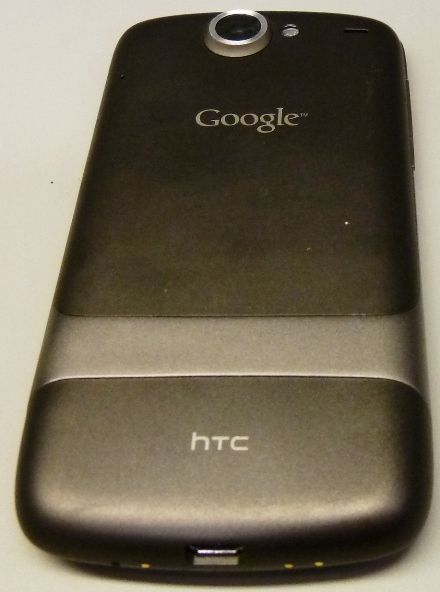
Figure 5: The back of the Nexus One. The Silver bar at the bottom is where an optional engraving can be placed, and the engraving is free!
Physically I have no complaints about the construction of the device. Future revisions could easily drop the trackball, and may put some sort of rubberized sides on the device to keep it firmly in hand. Turning now to the screen and comparisons with the G1, Figure 6 shows the devices side-by-side.
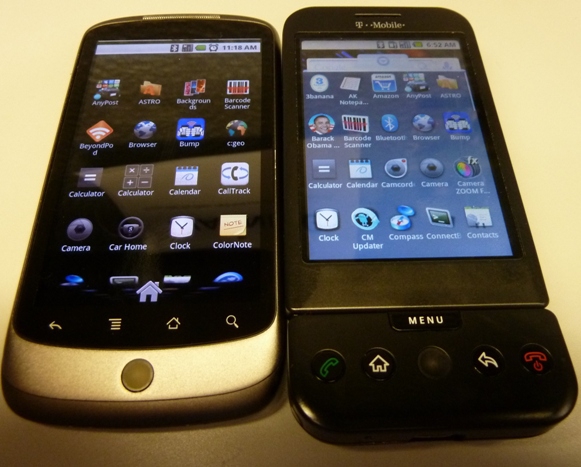
Figure 6: The Nexus One and G1 Application pages. While the background on the G1 isn't black (it's dark gray), the AMOLED screen on the Nexus One shows off how nice the black truly is and how crisp the resolution appears on text.
As can be seen in Figure 6, the AMOLED screen on the Nexus One is a vast upgrade from the G1's screen. Both in resolution and in colors, the Nexus One screen shines, and is probably the first thing someone used to Android will notice about the device. I'll talk more about the screen in the next section.
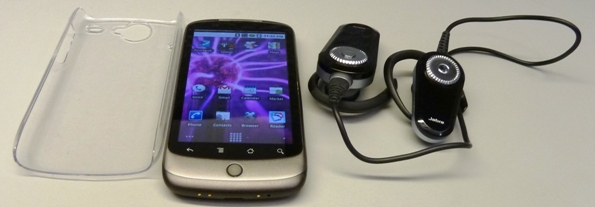
Figure 7: The daily accessories, Bluetooth headphones on the right, and plastic hard case on the left.
Often the three things in Figure 7, case installed on the phone, will sit together in my pants or coat pocket until I'm ready to listen to some music or a podcast. The headphones are Jabra BT8010's, and convert from stereo to mono easily - a feature I really like about that model. I'll talk more about how the Bluetooth streaming works in the sections below.
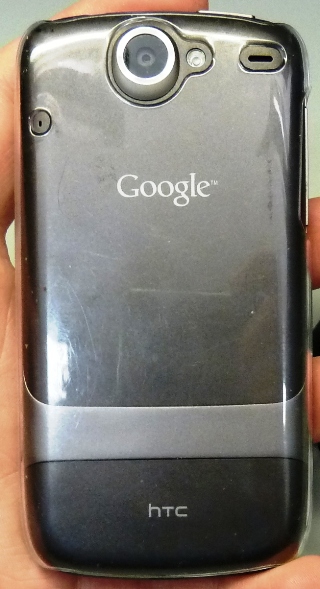
Figure 8: The back of the unit with the hard plastic case installed.
With the plastic hard-case installed ($20, available at T-Mobile retail stores), the back takes on a bit more shiny and rugged appearance. The case is tight along the sides of the device, producing faint black markings that look like scuffs until you take off the case and realize that no damage is present. I take the case on and off several times a day (as the phone doesn't fit in the dock with it on) and so far it hasn't scratched the finish or scuffed the device. I have heard reports of some units having paint chip away from the bottom near the gold contacts (See Figure 3), however, that doesn't seem to have affected my device. Since my phone was purchased in March, after the initial run of devices in January, they may have re-mixed the paint formula to avoid this.
Screen: Why AMOLED Means No Going Back
The first thing one notices about the Nexus One after turning it on is the screen - it looks... different. Different in this case means good - it's an Active Matrix Organic Light-Emitting Diode (Or AMOLED), which means it has a beautiful picture and uses less power than a traditional LED display. It's most noticeable in the Nexus One on the launcher screen, where the black looks black - not washed out as on many other displays.
At 800 x 480, the resolution also helps the AMOLED screen shine. This display not only looks good, it also refreshes fast which prevents some lagging in screen transitions. Suffice to say that now that I've used a device with an AMOLED display, I do not see myself wanting to return to a regular LED!