Android Thoughts - Opinions, News, Advice & Reviews on Android Devices

Got a Hot Tip? We Want To Hear It! Use Our Contact Form


Apple Thoughts

Loading feed...

Laptop Thoughts

Loading feed...

Digital Home Thoughts

Loading feed...


All posts tagged "instant messaging"


Friday, December 17, 2010

Trillian 1.0 for Android Released

Posted by Craig Horlacher in "Android Software" @ 08:00 AM

http://blog.ceruleanstudios.com/?p=1843

"We are pleased to announce that Trillian for Android, the best way to chat with your friends everywhere, is now available on the Android Market! Trillian is priced at only $4.99, so skip your extra fancy dessert coffee for a day and help support the team at Cerulean Studios!"
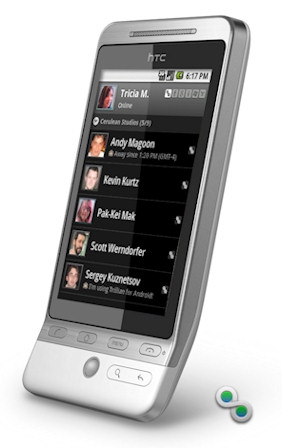
Cerulean has released version 1.0 of their Trillian messaging client for Android. If you do lots of instant messaging you're probably familiar with Trillian. If you're not familiar with Trillian, you can use it for accessing nearly any instant messaging, email, or social network messaging system.

Have you used the new Android release of Trillian? Tell us your what you think!


Thursday, September 30, 2010

Latest Trillian for Android Adds New Sort Options, Faster Notifications

Posted by Don Sorcinelli in "Android Software" @ 08:00 AM

http://blog.ceruleanstudios.com/?p=1612

"Build 110 is now available for all testers. New features include the ability to group your contact list by service or to run in a "no groups" mode. Also, users of 2.2 can now benefit from Google's C2DM service, which means your notifications should arrive almost instantly! If you're on 2.2 and want to try this, make sure the battery saving preference is enabled to get started. As always, we've also fixed a number of bugs in this build."

When I first heard that the multi-protocol instant messaging client Trillian was available for Android, I admit it - I was overjoyed. Even in it's beta form, it is perhaps the best application in it's class. The latest build adds more great features and bug fixes.

You can download the latest beta directly to your device by using your web browser and going to http://www.trillian.im/get/android. Just remember - to install this application (which is not being downloaded from the Android Market), you will need to change most device's default security settings to "Allow Unknown Sources".


Reviews & Articles

Loading feed...

News

Loading feed...

Reviews & Articles

Loading feed...

News

Loading feed...

Reviews & Articles

Loading feed...

News

Loading feed...

Reviews & Articles

Loading feed...

News

Loading feed...

Reviews & Articles

Loading feed...

News

Loading feed...

Sponsored links