Android Thoughts - Opinions, News, Advice & Reviews on Android Devices

Subscribe to Us Using RSS - Really Simple, Really Awesome


Apple Thoughts

Loading feed...

Laptop Thoughts

Loading feed...

Digital Home Thoughts

Loading feed...


All posts tagged "labels"


Monday, April 25, 2011

Gmail Labels: It's Not The Size That Matters... Or Is It?

Posted by Jason Lee in "Android News" @ 11:00 AM

http://gmailblog.blogspot.com/2011/...s-in-gmail.html

"Today we're making a small change that makes it easier to handle long label names: you can now add and edit label names up to 225 characters. The old limit was 40 characters, which wasn't enough for some people who had switched from Outlook or accessed Gmail through IMAP."
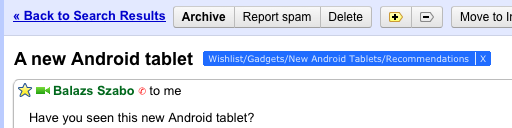
This is wonderful news for anyone who has ever tried to use nested labels within Gmail or anyone with OCD issues like myself. In many cases 40 characters just wasn't enough to contain the full path and properly descriptive label you desired. Well worry no more, my friends. You now have a full 225 characters categorize and sort your precious email. Any of you out there ever hit the 40 character limit? Think you'll ever hit the 225 character limit? ;)

Thursday, March 10, 2011

Google Helps Out In Emergencies, And With Some Smart Filters

Posted by Jon Westfall in "Android News" @ 05:30 AM

http://gmailblog.blogspot.com/2011/...og+(Gmail+Blog)

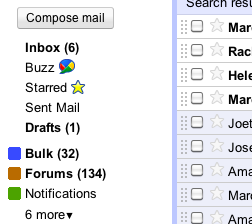
"Last year, we launched Priority Inbox to automatically sort incoming email and help you focus on the messages that matter most. Today, we're launching a complementary feature in Gmail Labs called Smart Labels, which helps you classify and organize your email. Once you turn it on from the Labs tab in Settings, Smart Labels automatically categorizes incoming Bulk, Notification and Forum messages, and labels them as such. “Bulk” mail includes any kind of mass mailing (such as newsletters and promotional email) and gets filtered out of your inbox by default (where you can easily read it later), “Notifications” are messages sent to you directly (like account statements and receipts), and email from group mailing lists gets labeled as “Forums.”

Two quick notes from Big G today. First, a new labs feature, Smart Labels, will automatically do some of the label heavy lifting for you. A second note details a new feature that should help in emergencies - Google will now provide Direct dial links for emergency numbers in mobile search listings, letting you get straight to authorities when time is of the essence. Nice work Google!


Tuesday, March 1, 2011

Suffering From Label Overload? Help is Just a Click Away

Posted by Kevin Jackson in "Android Talk" @ 09:30 AM

http://gmailblog.blogspot.com/2011/...og+(Gmail+Blog)

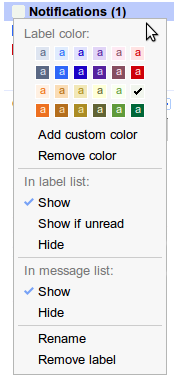
"We created the 'Hide read labels' and 'Hide Labels from Subjects' labs to help people manage their ever-growing lists of labels. Given the popularity and usefulness of these labs, we've decided to graduate them into fully-fledged features."

It's always nice to see Lab features move on up to the big time. I use a similar feature extensively in Google Reader and can imagine that it would be helpful for hard-core Gmail label users. So, how many labels do you use and do you think this feature will be useful to you?

Tags: labels, google, gmail, labs

Reviews & Articles

Loading feed...

News

Loading feed...

Reviews & Articles

Loading feed...

News

Loading feed...

Reviews & Articles

Loading feed...

News

Loading feed...

Reviews & Articles

Loading feed...

News

Loading feed...

Reviews & Articles

Loading feed...

News

Loading feed...

Sponsored links