Tuesday, November 23, 2010
Xperiencing the SonyEricsson Xperia X10
Posted by Don Tolson in "Android Articles, Resources & Developer" @ 08:00 AM
Radios
The radios are really the 'heart' of any smartphone, since they provide communication to the rest of the world -- whether it be voice or data via GPRS; Internet via WiFi; or Location positioning via GPS. I've spent a lot of time working with and tweaking the capabilities of the radios with various Windows Mobile units I've owned over the years. I have to admit, I was very pleasantly suprised at the capabilities of the X10's communications right out of the box.
GPRS (Cellular)
The X10 comes with the standard quad band cellular radio which handles GSM, Edge and 3G (including HSDPA and HSUPA) data connections (GSM 850/900/1800/1900, HSDPA 900/1700/2100 - European and T-Mobile, HSDPA 850/1900/2100/800 for other NA). The version supplied by Rogers handles the 3G frequencies for their network here in Canada which are similar to the 3G frequencies used by AT&T in the US, so you should be able to get onto their 3G network with no problems. There was no evidence that it was using the higher 'H' speeds, but that could be due to a limitation of the icons provided in the notifications bar at the top of the screen. Sensitivity (# of bars) seems to be equivalent to all of the other high-end phones I've owned and I've never had a problem getting connection or with calls dropping.
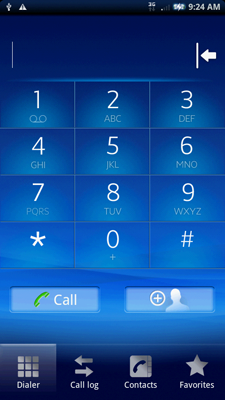
Figure 18: A screenshot of the dialer on the X10. Nothing particularly special here. There is an option to have beeps on each keypress, but I found that slowed down the response time too much.
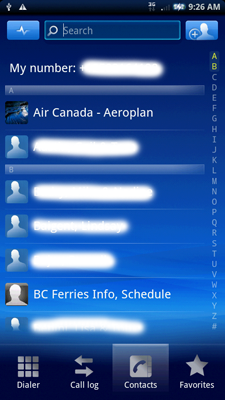
Figure 19: A look at the Contacts list. Again pretty standard stuff. One niggle is that when you select a Contact with multiple contact numbers, you get the expected screen asking which one to use, but after selecting one, you go back to the Dialer screen with the number filled in but it doesn't automatically dial. You have to press 'Call' to get it to dial.
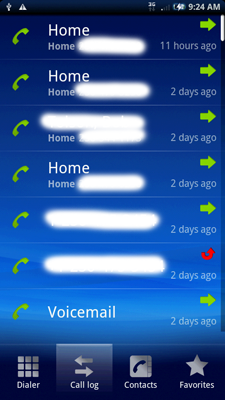
Figure 20: The call log is fairly standard as well. Here though, if you press the call icon (green phone) to the left of the entry, it will directly dial the number (which is as it should be...). There doesn't seem to be a limit on the length of the call log as mine currently goes back to when I first got the phone.
Bluetooth
The Bluetooth radio and stack provided with the X10 supports v2.1 with A2DP. I had no problem pairing it up with my stereo headset (Motorola) and phone earpiece (Helium Digital). It also easily paired up with the family Toyota Prius. The range of the BT is pretty similar to the other smartphones I've owned, typically 25 to 30 feet (10m) within the house or office.
As with other audio portions of the X10 (which I'll talk more about later), I found the BT volume range to be rather limited. Yes, there's sufficient volume for phone calls and listening to music, but you're at the top of the volume control. There just isn't any more oomph available for softer passages or noisy environments.
WiFi
The 802.11 b/g receiver in the X10 is much better than all the other phones I've owned or tested. The X10 is easily able to connect into the router from anywhere in the house, and even in the back yard. The signal stability is excellent with no dropped connections and good data transfer rates.
GPS
Here, the X10's GPS receiver also excels. It is noticeably more sensitive than any other phone I've had. Location lock is achieved in seconds, even after a reset (power down, then power up again) which usually clears out the memory in the GPS chip, so it has to download the satellite almanac data again. (No, I don't have AGPS turned on.) The receiver is also able to pull in signals inside buildings and structures that were totally blank with other phones. I did notice, however, that if the Bluetooth is activated first, then you attempt to use the GPS, the software can't find the internal receiver (perhaps it's looking for a BT-connected one?). If you start up the GPS first, establish connection to the internal reciever first, then turn on the BT, everything works fine.
FM
I have no evidence to support this, but I suspect the Snapdragon chipset includes an FM receiver. Unfortunately, there seems to be no way to access it. There is no FM radio application included in the package from Rogers, and there is nothing specific mentioned in the specs from S/E. That's too bad, since, while I don't use it often, it's nice to have it for a change of pace from the stored music.